

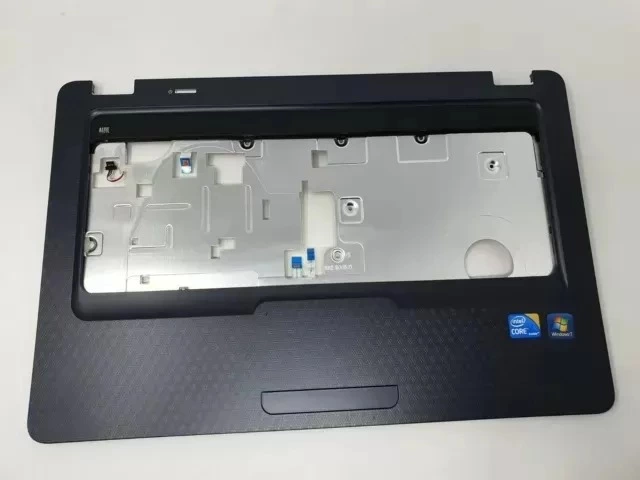

Refurbished HP G62-a03SA touchpad & base
Brand: HP
Model: HP G62-a03SA Laptop
Type: Touchpad with Palmrest/Base Assembly
Material: Durable Plastic / Composite
Compatibility: HP G62 Series Laptop
Usage: Laptop Repair & Replacement
Product Overview
The HP G62-a03SA Laptop is a IT product designed for dependable everyday performance. As a dependable IT hardware, it brings together its verified specifications to deliver consistent, everyday value for home, office, and business users. Supplied in refurbished condition, it provides a cost-effective option without compromising on capability.
Key Features
- Brand: HP
- Model: HP G62-a03SA Laptop
- Material: Durable Plastic / Composite
- Compatibility: HP G62 Series Laptop
- Pack Size: Touchpad Unit with Palmrest/Base
- Usage: Laptop Repair & Replacement
- Product Name: Refurbished HP G62-a03SA Touchpad & Base Assembly
- Product Type: Touchpad with Palmrest/Base Assembly
- Touchpad Type: Multi-touch Touchpad
Performance & Efficiency
The IT product is built to deliver consistent, reliable performance for dependable everyday performance, focusing on stable everyday operation rather than unnecessary complexity.
Compatibility & Expandability
Compatibility is covered through Compatibility: HP G62 Series Laptop. This makes it straightforward to integrate the IT product into existing setups and connected equipment.
Connectivity, Storage & Features
Key connectivity and functional details include Usage: Laptop Repair & Replacement; Pack Size: Touchpad Unit with Palmrest/Base.
Design & Build Quality
In terms of build, it features material Durable Plastic / Composite, color Black / Grey (varies), giving it a practical, well-considered design suited to daily use.
Ideal For
- Home and office use
- Everyday computing needs
- IT setups and upgrades
- Reliable daily performance